
Outbound automation should make each interaction more relevant, not simply make your team louder. Automating outbound marketing workflows can give B2B teams time back, but poorly governed systems can also scale stale data, generic messages and missed handoffs. More activity isn’t progress if it weakens trust or fills the pipeline with poor-fit leads.
If prospect research, list handling and follow-up consume your team’s week, the appeal of automation is obvious. The challenge is connecting systems and speeding up execution without handing strategy over to a sequence or an AI agent. That takes clear data rules, ownership and human review, not just more tooling.
This guide shows you how to automate outbound marketing workflows without sacrificing relevance, control or measurable revenue impact. You’ll learn which tasks to automate and where human judgement matters, how to build a controlled process with reliable handoffs, and how to measure efficiency alongside qualified pipeline and conversion quality. We’ll also look at how marketing operations and go-to-market alignment make automation work as a revenue system, rather than a collection of disconnected tasks.
Key Takeaways
- Automating outbound marketing workflows means connecting research, qualification, personalisation and follow-up, not simply scheduling more messages.
- Map each workflow stage to its trigger, required data, action, owner and exit condition so handoffs are clear and accountable.
- Protect relevance by validating prospect data, reviewing messaging and setting rules for when outreach should pause or move to a person.
- Start with one bounded workflow, establish a baseline and assess operational efficiency alongside qualified pipeline and conversion quality.
- Align your ideal customer profile, positioning and sales handoffs before expanding automation across more segments or systems.
What Automating Outbound Marketing Workflows Actually Means
Automating outbound marketing workflows means coordinating the steps that move a prospect from a relevant signal to an appropriate sales handoff. It isn’t simply scheduling more outbound messages. A workflow connects research, qualification, personalisation, approvals, sending, CRM updates and follow-up. It also defines what happens next and when a person needs to intervene.
An outbound marketing workflow is a defined sequence of data checks, decisions and actions that guides a prospect from identification to outreach or handoff. Marketing automation provides a useful foundation, but the workflow itself must reflect your team’s strategy, data standards and ownership. Tools can execute rules, but they can’t decide whether those rules make sense for your market.
Which outbound tasks are suitable for automation?
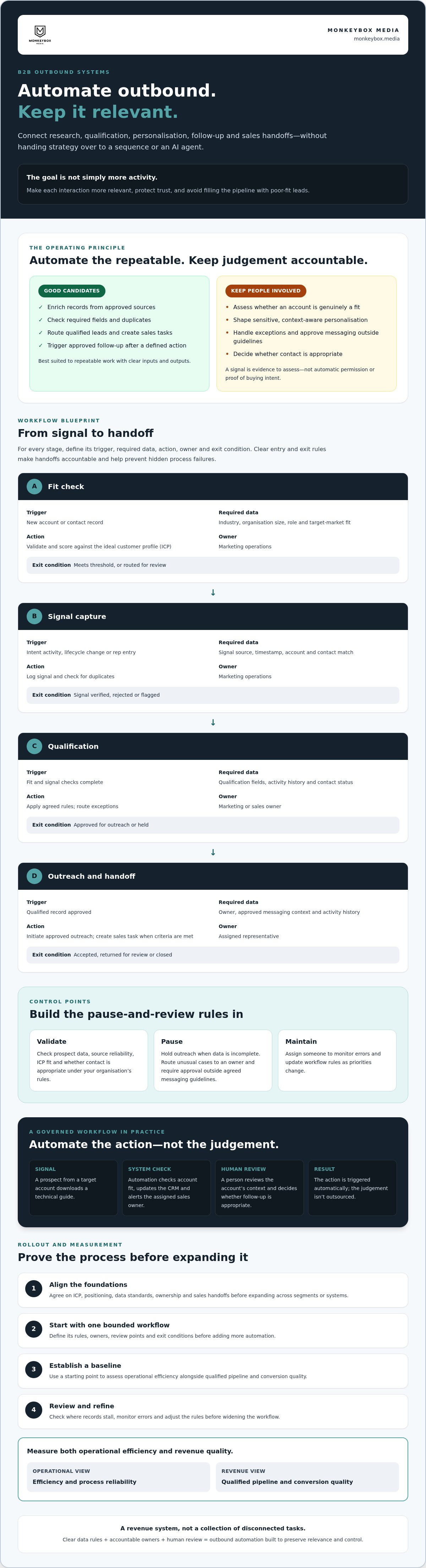
Automate repeatable work with clear inputs and outputs. Examples include enriching records from approved sources, checking required fields, routing a qualified lead, creating a sales task and triggering an approved follow-up after a defined action. These controls reduce manual handling and make it easier to spot where records stall.
Keep context-heavy work under closer review. Understanding why an organisation might be a fit and shaping a message around that context take more than filling in a template. AI agents can support governed steps in a workflow, but their outputs still need boundaries, review and a clear owner.
Hypothetical B2B example: A prospect from a target account downloads a technical guide. Automation checks account fit, updates the CRM and alerts the assigned sales owner. A person reviews the account’s context and decides whether a relevant, tailored follow-up is appropriate. The action is triggered automatically; the judgement isn’t outsourced.
Where should human judgement stay in the process?
People should remain accountable for positioning, sensitive personalisation, exceptions and the decision to contact. A signal, such as a content download or a change in role, is evidence to assess, not automatic permission or proof of buying intent. Check whether the signal fits your ideal customer profile, whether the information is reliable and whether contact is appropriate under your organisation’s rules.
Build review points into the workflow. Pause when data is incomplete, route unusual cases to an owner and require approval for messaging outside agreed guidelines. Assign someone to monitor errors and update rules as priorities change. That’s how human oversight protects relevance as activity scales.
Mapping Outbound Marketing: From Signal to Handoff
A reliable outbound workflow needs more than a trigger and a sequence. Define how a prospect qualifies, which system holds each record, who owns the next action and what counts as a completed handoff. Every automated stage needs a clear entry rule and an exit rule, or exceptions will become hidden process failures.
Use this stage map as a starting point for automating outbound marketing workflows. Adjust the fields and decision thresholds to match your ideal customer profile (ICP) and sales process.
| Stage | Trigger | Required data | Action | Owner | Exit condition |
|---|---|---|---|---|---|
| Fit check | New account or contact record | Industry, organisation size, role and target-market fit | Validate and score against the ICP | Marketing operations | Meets threshold, or routed for review |
| Signal capture | Intent activity, lifecycle change or rep entry | Signal source, timestamp, account and contact match | Log signal and check for duplicates | Marketing operations | Signal verified, rejected or flagged |
| Qualification | Fit and signal checks complete | Qualification fields, activity history and contact status | Apply agreed rules; route exceptions | Marketing or sales owner | Approved for outreach or held |
| Outreach and handoff | Qualified record approved | Owner, approved messaging context and activity history | Initiate approved outreach; create sales task when criteria are met | Assigned representative | Accepted, returned for review or closed |
What should trigger an outbound workflow?
Triggers can include explicit intent, such as a relevant enquiry; firmographic fit, such as meeting defined account criteria; lifecycle changes, such as a role or account-status update; or a representative entering a reason to follow up. Set the ICP and qualification threshold first. A useful signal gives your team a reason to assess fit, not proof that someone is ready to buy.
How should data and handoffs move between systems?
Assign a system of record for each data type. For example, use the CRM for account and contact ownership, a consent-management source for permissions, and a sales engagement platform for outreach activity. Marketing operations tools can coordinate workflows and field updates, but teams must agree which system takes precedence when records conflict. Define required fields, field owners, deduplication rules and what sales must confirm to accept a handoff.
Don’t let failed syncs, missing fields or duplicate records disappear into an unmonitored queue. Route them to a named operations owner with a status, reason and resolution path. A workflow is only as dependable as its exception handling. Teams reviewing these foundations may find GTM strategy and marketing operations support useful when priorities, ownership or system rules need alignment.
Does Outbound Automation Make Outreach Generic or Risky?
No, not by itself. Automation can make outreach more consistent by applying agreed qualification, messaging and timing rules. The risk comes from weak rules. Inaccurate records can send a message to the wrong person, repetitive copy can make every interaction feel interchangeable, and poorly timed contact can ignore what a prospect has already done or said.
That’s why automating outbound marketing workflows should include controls, not just actions. Use review thresholds for uncertain signals or high-value accounts, suppression rules to prevent unsuitable or repeated contact, and escalation paths for records that fail checks. Automation should stop when confidence is low. It shouldn’t turn uncertainty into a send.
How can automation preserve relevance and personalisation?
Build approved message frameworks around verified account context, such as a confirmed role or relevant business priority. Don’t invent personal details or present inferred interest as fact. Require human approval for high-value accounts, uncertain signals and sensitive claims. Define frequency caps and stop conditions too, so separate workflows don’t send conflicting or excessive messages.
For example, a change in job title might prompt a record review, not an automatic message that assumes the person owns a particular project. A representative can check the context before deciding whether to personalise and contact. That extra decision point protects credibility while routine administration continues at scale.
What governance should an outbound workflow include?
Assign named owners for data quality, workflow logic, message approvals and incident response. Document who can change rules, how changes are reviewed and what happens when a workflow sends an incorrect or unsuitable message. Keep an audit trail of changes and outcomes so the team can understand what happened and correct the process.
- Suppression: Define which records must be excluded and how exclusions are applied across connected systems.
- Data: Set expectations for accuracy, access and retention, and route incomplete or conflicting records for review.
- Testing: Check edge cases, such as duplicate contacts, missing fields, changed account ownership and conflicting campaign activity, before expanding the workflow.
- Escalation: Make clear who investigates failures and who can pause a workflow.
For UK teams, privacy and electronic marketing obligations can depend on the type of contact, data and activity involved. Verify which requirements apply to your workflow with qualified guidance before launch. Treat compliance as an operating control, not a box to tick after the sequence is built.
How to Implement and Measure Outbound Workflow Automation
Roll out automation as an operating change, not a switch you flip. A disciplined sequence exposes weak data and unclear ownership before those problems spread across more segments or systems. Start small, define what success means, then expand only when the workflow performs reliably.
Which outbound workflow should a team automate first?
Choose a frequent, repeatable process with clear inputs, an accountable owner and an outcome the team can measure. For example, routing a qualified enquiry to the right sales owner may be easier to control than automating a complex, multi-signal prospecting journey. Assess business impact, data readiness, operational risk and implementation effort together.
Don’t automate a process the team can’t explain. If records are unreliable, handoffs are disputed or the current process changes from case to case, resolve those causes first. Automation will reproduce the underlying process, including its defects.
- Baseline: Record current completion times, failure points, handoff quality and relevant pipeline outcomes.
- Prioritise and map: Select one bounded workflow and document its trigger, rules, owner, exceptions and exit conditions.
- Configure and test: Set up the workflow, then test normal cases and edge cases with a limited, controlled group.
- Launch and improve: Monitor the pilot, review exceptions with the people who handle them, and refine the rules before adding segments or systems.
Keep the pilot narrow enough to diagnose. If a record fails qualification or a handoff is rejected, the team should be able to trace the cause to a specific rule, field or ownership decision.
Which metrics reveal whether automation is working?
Measure execution and commercial quality side by side. Operational indicators show whether the workflow runs as designed; outcome measures show whether it supports useful sales conversations and pipeline. Compare results with your own baseline, and review trends over a consistent period rather than relying on a single campaign snapshot.
- Workflow health: Track completion failures, sync errors, missing or duplicate data, and exceptions requiring manual review.
- Team effort: Monitor review time and whether agreed follow-up happens consistently.
- Lead quality: Assess qualification rates, sales acceptance of handoffs and reasons for rejection.
- Revenue contribution: Follow qualified meetings, opportunity progression and pipeline associated with the workflow, while being clear about attribution limits.
Send volume alone can’t prove a workflow is effective; quality depends on what happens after the message is sent. Set review criteria before launch, then use the findings to decide whether to refine, pause or scale. For help aligning the rollout, measurement and operating model, discuss your marketing automation and operations.
When Strategic Marketing Operations Support Can Improve Outbound Automation
More automation won’t fix competing definitions of a qualified lead, unclear decision rights or disconnected systems. It can make those problems move faster. Strategic oversight can help when teams see repeated handoff failures, conflicting priorities or workflows that no one clearly owns. The first task is to determine whether the constraint is technical configuration or a deeper issue in positioning, process or go-to-market alignment.
When does a workflow need strategic oversight?
Look for patterns: sales repeatedly rejects leads for reasons marketing doesn’t track, teams disagree on which accounts fit the ideal customer profile (ICP), or the same record moves between systems without a clear next owner. These signs point beyond a sequence-setting issue.
A configuration problem may require correcting a field mapping or trigger. An operating-model problem needs teams to agree on what the field means, who maintains it and how it supports the GTM strategy. Before automating outbound marketing workflows, align the ICP, positioning, qualification criteria, sales handoff and workflow priorities. Give marketing, sales and operations clear decision rights. That keeps automation connected to commercial goals rather than optimising isolated activity.
What should a useful first engagement clarify?
Start with the outcome the organisation needs to improve, then define the workflow scope and how success will be assessed. A focused review should establish:
- Business outcome: Which qualified pipeline or conversion issue should the workflow support?
- Scope and ownership: Which segment, process stages, systems and teams are involved, and who makes decisions?
- Current baseline: What do existing handoffs, data quality and workflow results show?
- Delivery priorities: What needs process design, implementation, governance or ongoing optimisation?
This sequence prevents teams from treating every challenge as a tooling gap. It also makes the next steps explicit: resolve strategic disagreements first, define the operating rules, then configure and test against an agreed baseline.
Monkeybox Media brings fractional CMO leadership, GTM strategy, marketing operations and marketing automation expertise to this work. The right mix depends on the organisation’s constraints. AI agents can also be considered within a governed workflow, with clear oversight and responsibilities.
If unclear ownership or fragmented systems are slowing your outbound programme, discuss your outbound workflow requirements and identify where strategic alignment or implementation support may help.
Build an Outbound System That Scales Relevance
Effective outbound automation isn’t measured by how many messages leave the system. It’s measured by whether the right prospects receive relevant outreach, records move cleanly between teams and qualified opportunities progress. Automating outbound marketing workflows works best when clear entry and exit rules, reliable data and human oversight are built into the process.
Start with one well-understood workflow, assign ownership and establish a baseline. Automate repeatable administration, keep people accountable for decisions that need context, and assess operational performance alongside sales acceptance and pipeline contribution. Expand only when the pilot shows the process is controlled and useful.
If fragmented systems or unclear GTM priorities are holding back your next step, explore how Monkeybox Media can strengthen your B2B marketing operations. With the right strategy and operating discipline, your team can scale outreach without losing relevance or control. Build the foundations first, then grow with confidence.
Frequently Asked Questions
What does automating outbound marketing workflows mean?
Automating outbound marketing workflows means using defined rules and connected systems to coordinate repeatable steps from prospect identification to outreach and sales handoff. A workflow might validate account details, check qualification criteria, create a task and update a CRM record. It’s more than scheduling messages: it specifies what triggers each action, who owns exceptions and when the process should stop for human review.
Which outbound marketing tasks should businesses automate first?
Start with frequent, repeatable tasks that have clear inputs, owners and outcomes. Examples include checking required CRM fields, routing qualified records, creating follow-up tasks and updating activity records. First confirm that the underlying process and data are reliable. Automating unclear qualification rules or inconsistent handoffs can reproduce those problems at greater scale, making them harder to spot and resolve.
Can outbound marketing automation still feel personal?
Yes. Automation can apply approved message frameworks using accurate, relevant account context, while people review high-value prospects, uncertain signals and sensitive claims. Personalisation should reflect verified information, not invented details or assumptions about someone’s intent. Set frequency caps and stop conditions too, so separate workflows don’t send conflicting messages or continue after a prospect has replied, opted out or otherwise needs human attention.
How do you measure outbound workflow automation?
Measure operational reliability alongside sales quality. Track workflow failures, missing or duplicate data, manual review time and whether follow-up happens consistently. Then assess qualification rates, accepted sales handoffs, qualified meetings and downstream opportunity progression. Establish a baseline before launch and review trends over a consistent period. Send volume alone isn’t evidence of success if outreach fails to create relevant conversations or qualified pipeline.
What tools are needed to automate outbound marketing workflows?
The setup depends on the process, but commonly includes a CRM as the record of account, contact and ownership data; marketing automation for workflow rules; and a sales engagement platform for outreach activity. Data enrichment or integration tools may help connect records when needed. Choose tools around agreed processes, data ownership and reporting requirements. Start with the systems already in use before adding more technology.
Is automated B2B outreach compliant with UK privacy rules?
It can be, but using automation doesn’t make outreach compliant by default. Requirements depend on factors such as the recipient, channel, personal data involved and how contact details were obtained. Before launch, check which UK data protection and electronic marketing rules apply, document relevant permissions or other requirements, and maintain suitable suppression and unsubscribe processes. Seek guidance from the Information Commissioner’s Office or a qualified adviser for your specific circumstances.
How can a team prevent errors in automated outbound campaigns?
Set data checks, clear workflow owners, approval thresholds and rules for pausing or escalating uncertain cases. Test the process before launch with examples such as duplicate records, missing fields, conflicting activity and changes in account ownership. Keep a record of workflow changes and review errors, exceptions and outcomes regularly. If the team can’t identify who investigates a failure or pauses the workflow, fix ownership before scaling.