
Long B2B sales cycles don’t need more campaigns; they need better-timed signals. Marketing automation for complex sales connects customer behaviour, lead scoring and account-based marketing to help teams engage the right people throughout a multi-stage buying journey. It supports relevant follow-up while keeping sales and marketing aligned.
That complexity is real: B2B purchases can unfold over weeks, months or even years, with multiple influencers and decision-makers involved. Prospects research at different speeds, and a single contact’s activity rarely tells the whole account story.
This article explains what marketing automation is and how it works beyond scheduled emails. You’ll see how behavioural triggers can guide follow-up, how scoring helps assess sales readiness, and how account-based workflows nurture several stakeholders in one organisation. It also covers the role of CRM integration, the practical challenges of implementation and the way automation can support long-term B2B opportunities without replacing the judgement of sales and marketing teams.
Key Takeaways
- Connect automation with CRM data to give sales and marketing a shared view of prospect activity and progress.
- Use observed behaviour to shape relevant follow-up instead of sending the same sequence to every prospect.
- Score leads against clear readiness criteria, while nurturing multiple stakeholders with role-specific content.
- Map workflows and agree on attribution measures before implementation to make performance easier to assess.
- Support long buying journeys with timely content and closed-loop reporting that helps teams refine future investment.
What is Marketing Automation?
Marketing automation for complex sales uses software to coordinate campaigns, data and follow-up across a connected customer journey. In the UK, UK GDPR governs personal-data processing, while PECR applies to electronic marketing. Build audience permissions, lawful processing and opt-out handling into campaign workflows.
For complex B2B sales, the platform’s value depends on how reliably it connects marketing activity with customer records. CRM integration gives teams a shared view of contacts, campaign engagement and progression towards an opportunity.
Enterprise Platforms and Software Compatibility
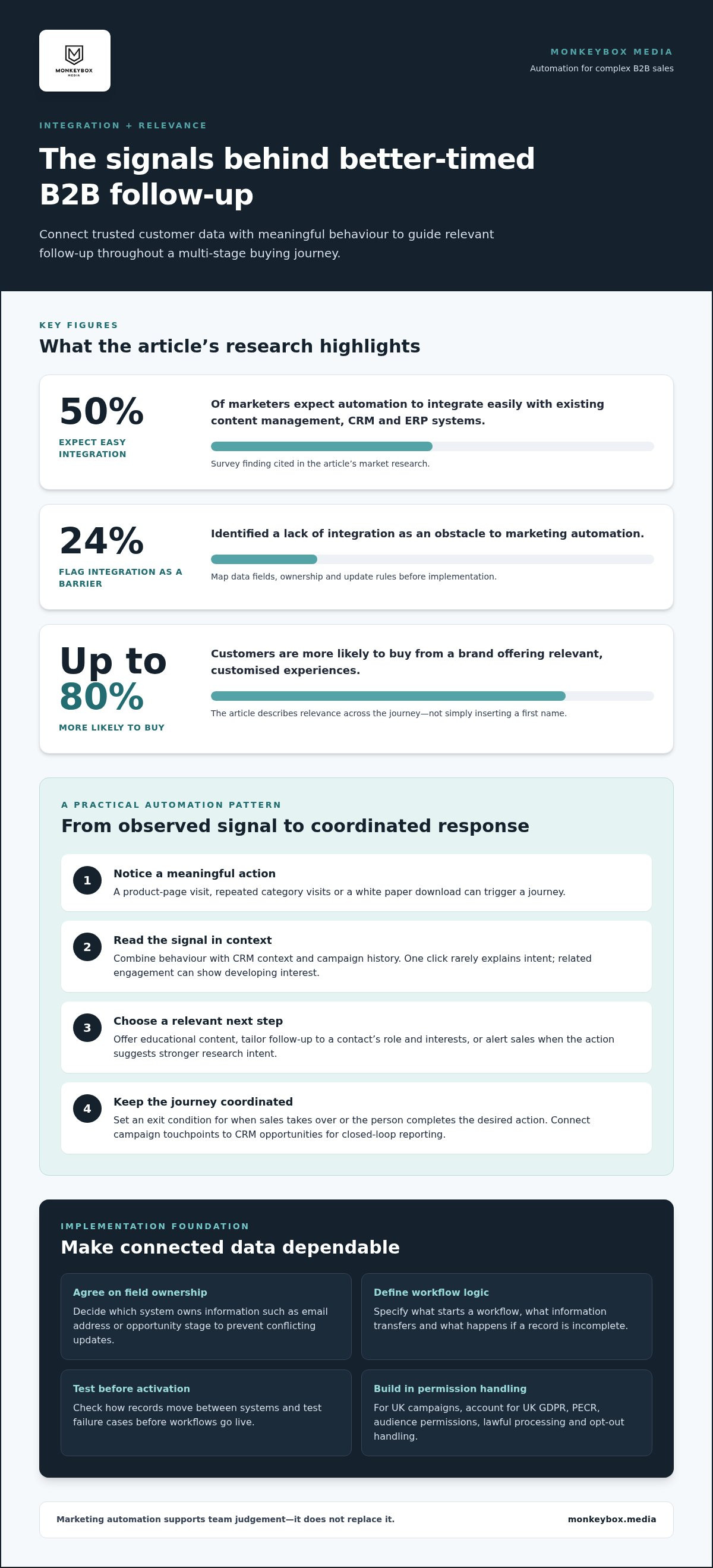
Enterprise compatibility means connecting automation software with the systems that already hold customer, sales and operational data. It matters because disconnected platforms create duplicate records and fragmented reporting. A survey finding cited in the market research states that 50% of marketers expect automation to integrate easily with existing content management, CRM and ERP systems. Another 24% identified a lack of integration as a barrier. Map data fields, ownership and update rules before implementation, then test how records move between systems.
CRM integration helps track a person from first contact through to customer. A campaign response can update a CRM record, while an account status can shape future nurturing. Shared data also connects campaign activity to sales outcomes, making marketing ROI easier to assess. Agree which system owns each field, such as email address or opportunity stage, to prevent conflicting updates.
Automated Workflows Across Business Systems
Automated workflows pass information or trigger actions across connected platforms, including through Zapier integrations. They are useful when a task spans systems: a form submission, for example, could create a CRM contact and alert a sales owner. ERP integration can link relevant operational data, while content management integration can support coordinated campaign experiences. Set triggers around meaningful events, define the data each step needs, and test failure cases before activating a workflow.
Zapier connects apps through trigger-and-action workflows, but each connection still needs clear logic. A new CRM record might trigger an internal notification, while a campaign response updates a contact field. Keep the workflow focused: specify what starts it, what information transfers, and what happens if a record is incomplete. For enterprise implementations, document system dependencies and permissions so changes in one platform don’t silently disrupt another.
Integration quality determines what teams can trust. When CRM, ERP and content management platforms share consistent records, marketing can coordinate campaigns using sales context and operational information. When they don’t, duplicate contacts and mismatched fields can weaken reporting and interrupt nurturing. Marketing Ops structures these connections around business processes, while Marketing Automation turns them into campaign and follow-up workflows. Prioritise dependable data flow over adding more software.
Marketing automation workflows triggered by customer behaviour
Behaviour-based workflows use prospect actions, such as visiting a product page, to shape the next campaign interaction. To measure ROI, connect campaign sources and marketing touchpoints to CRM opportunities and revenue through closed-loop reporting. This also shows where marketing influences pipeline.
Behaviour-Triggered Customer Journeys
A behaviour-triggered journey starts when a prospect takes a defined action, then sends a relevant message or prompts sales follow-up. Repeated visits to a product category, for example, could trigger educational content, while a product-specific white paper download could alert sales. These workflows help teams respond to observed intent rather than send identical campaigns on a fixed schedule.
Build each workflow around a clear signal and next action. A visit alone may call for more nurturing, while a content download can indicate stronger research intent. Combine the trigger with existing CRM context, then set an exit condition for when sales takes over or the person completes the desired action. This keeps follow-up coordinated.
Customer Data and Personalised Messages
Customer data helps tailor messages to a contact’s role, interests and recent interactions. A finance director reviewing implementation content needs a different follow-up from a technical lead exploring integration details. Segments based on CRM attributes and campaign activity make that distinction actionable, so each contact receives content suited to their buying questions rather than a generic sequence.
Personalisation should use meaningful signals, not superficial details. Match the topic, format and next step to what a contact has engaged with, then suppress messages that no longer fit. Up to 80% of customers are more likely to buy from a brand offering relevant, customised experiences. The practical value comes from relevance across the journey, not inserting a first name.
Behaviour Tracking and Customer Insights
Behaviour tracking records interactions with content, messaging, advertising and email, helping teams understand a prospect’s position in the funnel. A series of product-page visits followed by a webinar registration can signal a shift from general research to active evaluation. Use these patterns to identify content that earns attention and channels that contribute useful engagement.
Interpret activity in context. One click rarely explains intent, but repeated engagement with related materials can show a developing interest area. Compare each contact’s interactions with CRM status and campaign history, then adjust the next communication or sales handoff. Triggered communications account for 75% of email revenue, making reliable event tracking a core workflow requirement.
Nurturing Leads and Building Loyalty
Lead nurturing uses timely, relevant communications to maintain engagement while prospects research and make decisions. An automation solution can send a follow-up after a guide download, then change the sequence if the contact attends a webinar or requests a sales conversation. Responding to actual behaviour keeps marketing aligned with readiness instead of treating every lead alike.
Engagement continues after a purchase: customer actions can guide onboarding content, product education and useful account updates. A customer who views advanced-use guidance could receive related resources, while a quiet contact may need a different re-engagement message. Marketers use automation to improve customer engagement, with 34% identifying this as a goal. A clear workflow keeps nurturing purposeful across the relationship.
Strong workflows depend on clean event definitions, useful segments and coordinated CRM data. Teams refining these foundations can explore marketing workflow strategy as a way to align customer signals with campaign execution.
Lead scoring and account-based marketing
Lead scoring ranks prospects against defined signals, while account-based marketing focuses engagement on selected organisations. Together, they help B2B teams prioritise sales attention across a buying group, not just an isolated contact.
Lead Scoring and Qualification
Lead scoring assigns values to prospect fit and activity, then compares the result with agreed readiness criteria. A B2B team might weigh a target industry, relevant job role, product-page visits and white-paper downloads. Marketing automation can combine website, social media and direct marketing data, then flag leads that meet the handoff threshold. Clear criteria keep qualification consistent.
Set the model around outcomes sales can act on. A senior contact from a target account who downloads a product guide, for example, may merit a different score from an unrelated visitor reading a general article. Use negative signals, such as an unqualified role or inactive record, to lower priority. Forty-five per cent of marketers want lead qualification and scoring capabilities in automation solutions.
Account-Based Marketing and Buyer Journeys
Account-based marketing coordinates relevant engagement across multiple contacts in one organisation. Each stakeholder can receive content aligned with their responsibilities: a technical lead might receive integration material, while a finance contact gets information about business value. This role-specific approach reflects how B2B buying groups evaluate a decision from different angles, often across a lengthy journey.
Build account-level views alongside individual contact records. One person’s email marketing engagement can show interest, but activity from several stakeholders may reveal broader evaluation. Visits to product pages, event attendance and downloads across an organisation, for instance, can inform account prioritisation. Nurture each contact according to their role while keeping the account’s shared decision process in view.
Lead capture lays the foundation for that coordination. Record the source of each enquiry, such as a webinar registration, website form or event conversation, then map contacts to the right organisation in the CRM. Consistent fields for role, account and campaign help distinguish a new prospect from an existing contact. Review duplicates and incomplete records before scoring, or the model may treat one buying group as several unrelated leads.
Lead management turns qualification into a defined sales action. When a contact meets the agreed readiness criteria, automation can assign the lead, pass its score and activity history into the CRM, and pause nurture emails that no longer fit. Sales can then see why the lead qualified, including its source and relevant interactions. If the lead isn’t ready, return it to a journey that addresses its remaining questions.
Review scoring rules with sales against actual handoffs and outcomes. If contacts repeatedly reach the threshold without leading to useful conversations, refine the fit criteria or engagement signals. If qualified accounts remain overlooked, check whether CRM assignment rules cover every relevant role. This feedback loop ties prioritisation to the buying process instead of treating a score as a decision on its own.
Implementation challenges and best practices
Automation implementation connects processes, people and systems, so weak foundations can disrupt campaigns and reporting. Clear scope, accountable owners and measurable conversion goals keep the work focused.
Implementation Challenges
Implementation challenges arise when teams automate processes before mapping how those processes actually work. 60% of companies thought marketing automation implementation was difficult, while 54% identified mapping complex processes as a barrier. For example, a lead-routing workflow can fail if marketing and sales define qualification differently. Document each handoff, decision and exception before building messages or campaigns.
Data quality and attribution create further pressure. 31% of organisations struggle to prove marketing attribution and return on investment. Agree how campaigns, opportunities and revenue will be recorded, then test reports against real CRM records. Assign an owner to resolve duplicate or incomplete data. Without clear ownership, the platform can automate inconsistent inputs at scale.
Adoption also depends on whether teams understand the new workflow. Before launch, show marketers how to pause a sequence, correct a segment and update its audience. Give sales a clear view of what triggers a handoff and where to record the outcome. Start with one defined process, such as webinar follow-up, and review how it works before expanding to other journeys.
Use a controlled implementation cycle: map the process, configure a limited workflow, test it with sample records, then release it to the intended audience. Check that messages arrive at the right stage and suppression rules work. Record failures and assign fixes before expanding. Make diagnosing issues part of delivery, not an afterthought.
Pricing and Implementation Considerations
Pricing and implementation depend on the platform, connected systems and work needed to put agreed workflows into operation. Software pricing varies with the platform, contact volumes, integration complexity and implementation scope; suppliers provide pricing after a quote request. Compare options against the campaigns and processes you need, not features unrelated to your use case.
Scope also shapes the implementation plan. List required integrations, data migration, workflow configuration, testing and team training. Connecting a CRM and content management system, for example, requires decisions about field ownership and sync behaviour. Separate essential launch requirements from later enhancements so the first release stays manageable and teams can evaluate its performance.
Set success measures before selecting or configuring software. Choose indicators tied to the intended outcome, such as qualified handoffs, conversion from a defined campaign, or time spent on manual tasks. Assign responsibility for each measure and establish where its data will come from. A shared measurement plan helps teams distinguish workflow activity from business impact.
Document change control: who can edit messages, who approves audience rules, and how updates are tested. A change to one trigger can affect several automated journeys. Keep a record of workflow owners, dependencies and release decisions. This discipline helps teams maintain reliable automation as campaigns and business processes evolve.
Marketing automation for long B2B sales cycles
Marketing automation for complex sales coordinates relevant communications and follow-up across extended buying journeys. B2B purchases can span weeks, months or even years, involving multiple influencers and decision-makers.
That pace changes the job of marketing automation software. It must sustain useful engagement between buying milestones, not simply push a prospect towards an immediate sales conversation. A procurement team might research a solution, pause for internal review, then return with technical questions. An effective marketing automation for complex sales strategy keeps the next interaction relevant when that journey resumes.
Map communications to the decisions buyers need to make. Early-stage content can clarify the problem; later materials can address implementation, commercial value or stakeholder concerns. A procurement contact reviewing supplier requirements, for example, may need different information from a technical evaluator comparing integrations. Coordinate messages by role and stage so each interaction supports progress.
Long-cycle nurturing also needs to allow for inactivity. A quiet period doesn’t necessarily mean an account has lost interest; internal approvals or planning can slow activity. Use changes in engagement to adjust timing and content rather than sending repetitive emails on a rigid schedule. Marketing automation can maintain touchpoints, while sales judgement shapes direct outreach around meaningful signals.
Automation helps teams keep marketing and sales aligned over time. 27% of surveyed marketers say marketing automation improves their collaboration. Shared opportunity stages and activity history give both teams context: marketing can adapt nurture content, while sales can see previous engagement before contacting a stakeholder. The process needs clear handoff criteria and a route back to nurturing when a buying group isn’t ready.
Long-cycle programmes should connect activity with commercial outcomes. Closed-loop reporting can help organisations calculate cost per opportunity and marketing ROI, then use those findings to plan future investment. Compare campaign engagement with opportunity progression and eventual revenue, rather than treating clicks as the final measure. This gives teams a clearer view of which content and touchpoints support the buying journey.
Design for continuity, not volume. Automate repetitive coordination, such as delivering a relevant resource after a recorded milestone, while leaving complex objections and relationship decisions to people. Marketing automation software can increase sales productivity by 14.5%. The practical opportunity is to give sales more context and fewer manual tasks, while keeping each account’s next step visible.
For organisations with long procurement journeys, the priority is a strategy that links audience needs, sales milestones and measurement. Shape a long-cycle B2B automation strategy around those operating realities, so follow-up stays purposeful from early research through opportunity progression.
Monkeybox Media: Fractional CMO
Monkeybox Media helps B2B organisations connect marketing automation with the strategy and operations behind complex sales. Its Fractional CMO leadership can bring direction to teams that need clearer ownership, stronger alignment between marketing and sales, or a more focused go-to-market plan.
Through GTM Strategy, Marketing Automation and Marketing Ops, Monkeybox Media structures workflows, data and processes to support long buying journeys. Turn to this support when activity is fragmented, automation isn’t aligned with sales priorities, or the team needs strategic leadership to improve execution. The focus is a system shaped around your commercial goals and operating reality.
Contact Monkeybox Media to discuss your marketing needs, or visit monkeybox.media.
Turn Your Automation Strategy Into a Growth System
Treat automation as part of your go-to-market operating model, not as a standalone technology project. Choose a commercial outcome to improve, clarify who owns it, and align campaign activity with the decisions your sales team needs to support. This gives marketing automation for complex sales a clear purpose and a basis for ongoing refinement.
When your team needs strategic direction as well as execution, Monkeybox Media offers Fractional CMO leadership, GTM Strategy and Marketing Automation. These services help align priorities, workflows and measurement with your growth plans. Start with the challenge currently limiting progress, whether that’s unclear ownership, disconnected activity or a process that needs stronger structure.
Take the next step at a pace that fits your organisation. Contact Monkeybox Media to discuss how a more focused approach could support your B2B sales journey. Build the system deliberately, then keep improving it as your market and priorities evolve.
Frequently Asked Questions
Which marketing automation platforms support long sales cycles and multiple decision-makers?
Choose a platform that organises activity at both contact and account level, not just one that sends scheduled emails. For a long buying process, assess whether it supports flexible lifecycle stages, role-based segmentation, CRM data exchange and reporting across campaigns. Map these needs to your existing systems and sales process before comparing products. A platform that fits your operating model is more useful than one chosen solely for a long feature list.
How does marketing automation integrate with CRM and sales enablement tools?
Integration connects marketing activity with the customer and opportunity records sales teams use. A content interaction could appear in a CRM timeline, while a sales enablement tool could surface approved material for follow-up. Define which system owns each shared field, how updates are handled and what sales needs to see before outreach. Test the flow using sample records, including contacts linked to the same account.
How can businesses build lead scoring and qualification models for complex sales?
Start with sales’ definition of a useful opportunity, then translate it into observable fit and intent signals. Fit might include role, industry or account type; intent could include a demonstration request or repeated engagement with decision-stage material. Agree which signals raise or lower priority, and review qualified leads against sales feedback. If a score repeatedly produces unproductive handoffs, revise the criteria rather than simply raising the threshold.
What are effective nurture campaigns for long B2B buying journeys?
Effective nurture campaigns answer the buyer’s next question instead of sending a fixed sequence regardless of context. Offer an evaluation checklist after a prospect explores solution requirements, for example, then share implementation guidance when they engage with delivery material. Create paths for active research and quieter periods, with clear exit rules for sales conversations. Review which assets help contacts progress, and retire messages that add no useful decision support.
How should marketing automation support account-based marketing and buying committees?
Organise engagement around the target account while tailoring communications to each committee member’s priorities. A technical evaluator, finance stakeholder and executive sponsor may need different evidence before supporting the same purchase. Give teams a shared view of account engagement, then identify gaps, such as an active technical contact but no executive involvement. Coordinate campaign timing and sales outreach so each person receives a coherent experience rather than disconnected messages.
What does marketing automation cost in the UK, including implementation and licensing?
Costs depend on the platform’s licensing model, contact volumes, integrations, data migration, workflow scope and training requirements. Assess software licensing separately from implementation work; total cost depends on the systems and processes involved. Service pricing depends on the project and is provided after a quote request. Compare proposals against required outcomes, included implementation work and ongoing platform needs, not licence fees alone.
What are the steps to implement marketing automation for a complex sales organisation?
Begin by agreeing on the commercial goal and documenting the current buyer journey, handoffs and data sources. Then define account and contact fields, ownership rules, qualification criteria and required reporting. Configure one priority workflow, test it with representative records, then train marketing and sales on their roles. After launch, review handoff quality and campaign outcomes before expanding to other segments or processes. This sequence keeps implementation tied to business needs.
What are common marketing automation risks, data-quality issues and implementation failures?
Common risks include automating an unclear process, matching contacts to the wrong account, and relying on stale or incomplete records. These problems can misdirect messages, distort reporting and send unsuitable leads to sales. Set rules for duplicate handling, required fields and record ownership, then assign someone to maintain them. Document workflow dependencies and test changes before release, too. A campaign can function technically and still fail if its underlying data or logic is unreliable.